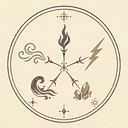
What are sigils and signs?
In this fan-made interpretation, a spell diagram works like a visual program. The primary sigil tells the simulator which element to manifest. Signs placed farther from the center modify the shape and movement of that element. The enclosing ring establishes the spell boundary and determines whether the drawing is prepared or active.
The reference below documents the simulator dictionary rather than claiming to reproduce every canonical symbol or rule from Witch Hat Atelier. Recognition is based on normalized stroke templates, so size can vary, but line structure and orientation still matter.
Elemental sigils
Fire Sigil
Chooses fire as the primary element. In the compiler it starts with a modest force and spread bias, producing energetic particles that respond strongly to column and convergence signs.
Try a fire spellWater Sigil
Chooses water as the primary element. It pairs naturally with levitation in the current example dictionary, where balanced signs reduce gravity and produce a suspended orb.
Try a water spellWind Sigil
The wind template represents air being directed through the diagram. Its effect renderer emphasizes moving streams whose tilt and direction come from surrounding sign orientation.
Draw a wind spellEarth Sigil
Selects the earth particle renderer. Force, focus, spread, and duration are still calculated from drawing quality and signs rather than being fixed values.
Draw an earth spellLight Sigil
Selects the light renderer. A clean central mark and an unambiguous match are especially important because the compiler rejects a primary sigil whose confidence is too low.
Draw a light spellModifier signs
Column
The Column sign creates a focused column manifestation. Its orientation is evaluated relative to its position on the ring, so rotating the same shape changes whether the spell flows inward, outward, or along the surface.
Levitation
Levitation reduces the compiled gravity value. Several balanced levitation signs can suspend an effect without producing a strong horizontal direction, as demonstrated by the Water Orb example.
Convergence
Convergence pulls the effect toward a calculated point and tends to increase focus while reducing spread. Placement changes the convergence point and effective region.
How to make a sigil recognizable
- Draw one primary sigil rather than overlapping two elemental symbols.
- Keep the primary sigil comfortably inside the ring and preferably near the center.
- Lift the pointer between separate symbols so the grouper does not merge them.
- Use deliberate lines and avoid unrelated ink crossing the symbol.
- Load an example when you need a reliable scale and placement reference.
The matcher allows reasonable size variation and some messy overdraw, but it rejects contaminated candidates when unexplained ink dominates the template. If the result says “Ambiguous sigil,” erase the center candidate and redraw it rather than adding more lines.
Placement, orientation, and scale
The ring is divided by normalized radius rather than fixed screen pixels. That means the same sign can work on a small laptop canvas or a larger desktop canvas as long as it occupies a comparable position inside the ring. Center, middle, and outer labels describe functional areas, not visible borders that must be traced exactly.
Primary sigils are currently permitted across multiple layers in the raw dictionary, but center placement receives a selection bonus and is easier for people to understand. Modifier signs are intended for the middle and outer areas. A mark placed near a layer boundary produces a warning because small drawing changes could move it between interpretations.
Orientation is significant for directional signs. The recognizer can rotate some templates while matching them, yet the compiler preserves the direction in which the mark was actually drawn. A Column sign on the left side can therefore push toward the center while the corresponding shape on another side produces a different surface direction.
Reading confidence and warnings
A recognized candidate must pass the general matcher floor, and a primary sigil must pass a stricter compiler confidence threshold. The compiler also compares the best primary match with the next plausible sigil. When the gap is too small, the spell is marked ambiguous even if the best score alone looks acceptable.
Unknown marks are retained in the glyph structure. A few peripheral unknowns may reduce stability without replacing the element. Unknown ink near the center is more serious because it can contaminate the primary decision. This makes the warning panel useful as a repair guide: identify whether the issue belongs to the ring, center sigil, sign layer, or an extra stroke, then erase only that part.
Using the Witch Hat Atelier sigils reference
The Witch Hat Atelier sigils on this page are best used beside the live canvas. Begin with one elemental choice, compare its main lines with the mini reference, and leave enough open space that the stroke grouper can separate it from signs and from the ring. The reference describes what this simulator recognizes; it is not a claim that the dictionary contains every symbol shown in the manga or anime.
When practicing Witch Hat Atelier sigils, load a prepared example before drawing freehand. Fire Shoot establishes a readable Fire scale, while Water Orb shows how a Water mark can sit inside balanced signs. Clear the example only after you have compared center placement, outer spacing, and the final ring gap.
The most useful Witch Hat Atelier sigils workflow is incremental. Draw the ring, add one sigil, and check whether the element appears. Add signs only after that result is stable. If the element disappears, Undo reveals whether the newest stroke contaminated an earlier candidate. Erase removes a complete stroke when the problem is older than the last action.
Because Witch Hat Atelier sigils are interpreted by a geometric matcher, stroke separation matters as much as overall appearance. A person may see two adjacent symbols while the browser sees one connected candidate. Lift the pointer between symbols, keep modifier marks away from the primary sigil, and redraw a candidate instead of repeatedly tracing over it.
Use Witch Hat Atelier sigils as controlled inputs: confirm one primary element first, then introduce signs one at a time. Reviewing Witch Hat Atelier sigils this way makes confidence changes and warning messages easier to connect to a specific stroke.
Witch Hat Atelier sigils FAQ
How many sigils and signs does this reference support?
The current fan dictionary includes five elemental sigils—Fire, Water, Wind, Earth, and Light—and three modifier signs: Column, Levitation, and Convergence. This is the simulator's working vocabulary, not a complete catalogue of every canonical symbol.
Are these official Witch Hat Atelier symbols?
No. This page documents the unofficial browser simulator's templates and drawing behavior. Consult official publications for canon terminology and story details.
Related questions
Is this information official Witch Hat Atelier canon?
No. These pages describe the behavior and dictionary of an unofficial fan-made browser simulator. They may use familiar names as context, but the implemented symbols, thresholds, semantic values, and animated effects are partial references and software interpretations. Consult official publications for canonical story material.
Can I load these references directly into the simulator?
The Spell Examples page links to two prepared presets that load into the homepage tool. The Sigils page is a drawing reference; individual elemental cards currently open the simulator but do not stamp a symbol automatically. This preserves the freehand recognition task while examples provide a reliable starting point.
Why does a clear-looking symbol sometimes fail?
People evaluate the overall appearance, while the parser evaluates captured strokes, grouping, normalized geometry, permitted layer, orientation, unexplained ink, and confidence relative to competing templates. Erase crossing marks, separate symbols into distinct strokes, and compare the candidate with the reference at a larger scale.
Does the tool save editable spell projects?
Not currently. The active drawing is held in browser memory. PNG export captures the visible paper and effect, but it does not preserve editable strokes or compiler data. Refreshing the page starts a new session, so download any result you want to keep.